
Working with AI on a codebase you didn’t write
I once got stuck setting up CAN for a modified OpenArm. I couldn’t find a video showing the thing I needed. An AI found one for a different robot, and it was enough to get me moving again. I wrote about it in My Algorithm.
The useful part was having a next step I could try. I want the same thing when I use an agent on code: a small change, an explanation I can follow, and a way to see whether it worked.
So let’s do that with Grimoire, an existing TypeScript app for saving and searching references. Imagine keeping public plant-health guidance, technical manuals and useful articles in one place. Then sharing a reference with a colleague. That is the small problem we’ll work on.
You’ll run the app, understand how a bookmark gets saved, add a Markdown copy action, fix a real clipboard bug, and check an integration’s access. One repository throughout. Allow roughly three hours, including setup; that’s a planning estimate.
Get it running first
Install VS Code, Git, Node.js and Bun. I tested Node 22.19.0 and Bun 1.4.4 on macOS Apple Silicon. Windows and Linux haven’t been checked for this tutorial.
- Download the Grimoire tutorial kit and extract it.
- In VS Code, choose File → Open Folder. Open the extracted Grimoire-Tutorial-Kit folder containing
prepare.mjs. - Choose Terminal → New Terminal. Run:
node --version
git --version
bun --version
node prepare.mjs
The helper clones the existing app at b68b69aa5292 (version 1.3.0), installs the locked dependencies and seeds a separate workshop library. Wait for Prepared. We’re keeping the revision fixed so the files match the instructions.
Open the new grimoire folder in VS Code. All remaining terminal commands run from this folder. Start two terminals and leave them running:
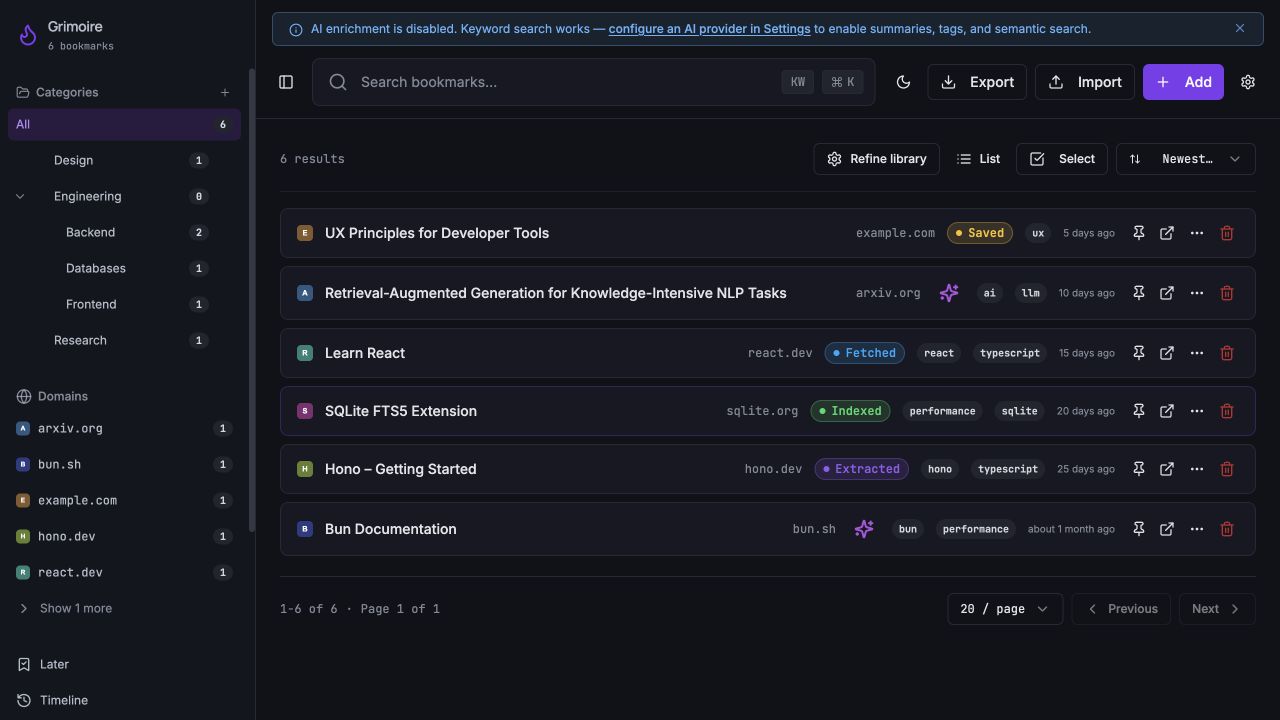
node workshop/run.mjs daemonnode workshop/run.mjs webOpen 127.0.0.1:8080. Skip the welcome tour. You should see six bookmarks and an “AI enrichment is disabled” notice. That’s expected. Keyword search works without a model. This local app has no login step.
The helpers put the database and settings in the ignored local/workshop/ folder, keep the server on your machine and disable AI providers and remote backup. Don’t use Grimoire’s global service installer for these labs. Don’t reseed a library you’ve started using.
Open a third terminal for checks. Run the baseline before asking an agent to change anything:
npm test -- --maxWorkers=2
node workshop/run.mjs test-daemon
npm run type-check
npm run lint
My baseline: 350 frontend tests and 704 daemon tests passed; type checking passed. Lint reported eight existing warnings and no errors. If your baseline fails, stop here and investigate the first error.
If setup gets stuck
Command not found: finish installing that tool, restart VS Code and check its version. If code . isn’t available, use File → Open Folder.
Port in use: the workshop needs ports 3210 and 8080. Close your previous workshop terminals with Ctrl+C. Don’t kill an unfamiliar process. The web command refuses a different port so it won’t silently move.
Database already exists: the seed helper intentionally refuses to wipe it. Keep that folder. Extract a new kit elsewhere if you want a clean start.
Dependency notices: my pinned npm install reported 21 audit findings: 18 moderate and three high. Don’t use npm audit fix --force during the exercise. This is a local training checkout; review dependencies before any deployment.
Put the agent beside the code
We’ll run OpenCode inside VS Code’s terminal. Open a fourth terminal for it; keep Terminal 3 for checks. This edition uses OpenCode 1.19.5; its current docs also describe a newer V2. Keep this exercise on V1 so its controls match.
npm install -g opencode-ai@1.19.5
opencode --version
opencode --model opencode/deepseek-v4.1-flash-free
Use DeepSeek V4.1 Flash Free (opencode/deepseek-v4.1-flash-free). The command above selects it; the kit also sets it as the default. If OpenCode is already running, type /models and select that model. No OpenCode account or API key is needed for this free route. Free availability and limits can change; check the current model terms. If it is unavailable or you reach a limit, use the reference solutions below to finish without adding billing.
Use Tab to switch between Plan and Build. Start in Plan. The kit asks for permission before edits and shell commands and blocks subagent delegation and access outside this checkout. Those are tool permissions, not an operating-system sandbox. Approve only actions you understand. An agent using a hosted model sends context to that provider; keep private work out of this exercise.
In VS Code, use Quick Open (Cmd/Ctrl+P) for a file path, Search (Cmd/Ctrl+Shift+F) for a function name, and the Source Control sidebar to inspect changed files. Click a file there to read its diff. You’ll use these more than any special prompt trick.
1. Follow one bookmark
In Grimoire, click Add, paste the URL below, and click Save Bookmark. Close the dialog. Wait for Indexed, then search for simply.
https://paulgraham.com/simply.html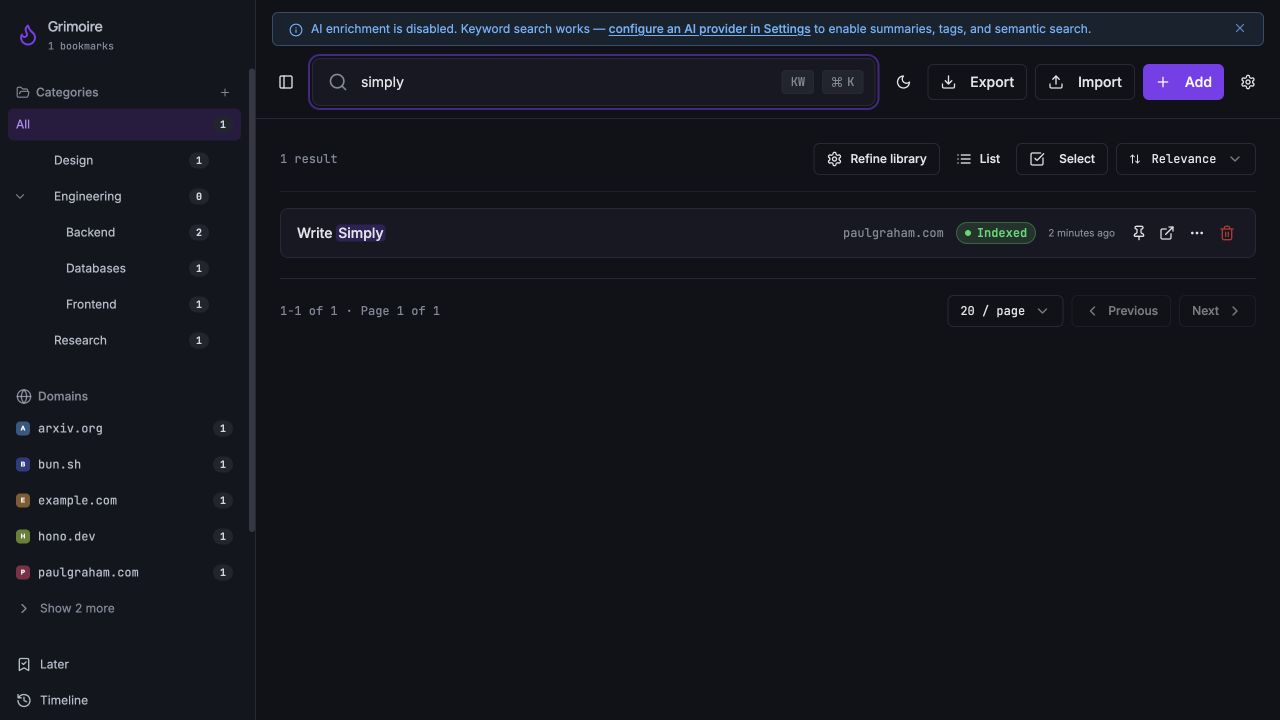
Now ask the agent how that happened. Stay in Plan:
Read AGENTS.md, including the isolated tutorial instructions.
Explain how saving https://paulgraham.com/simply.html works:
dialog -> hook -> API client -> daemon route -> database -> job
queue -> extraction/indexing -> keyword search.
Give real file paths and function names. Explain why the bookmark
can be searchable with AI enrichment disabled. Flag unknowns.
Use read/search tools directly; no subagents, edits or commands.
Open the files it names. You should be able to point to the form, the HTTP request and the database write yourself. The path in this revision looks like this:
The paths below the route are relative to daemon/src/. Search returns the indexed result through routes/search.ts. In Terminal 1 you can see the fetch, extraction and index messages. “Saved” confirms the record exists; “Indexed” is a later step. If the fetch fails, read that log before changing code.
Done when: your saved article appears in keyword search and you can explain why this works without an AI API key. If the agent names a file that doesn’t exist, correct it before moving on.
2. Make the reference easy to share
I save an article because I think I’ll use it later. Usually that means sending it to someone or putting it in a note. A bare URL makes the next person open it just to learn what it is.
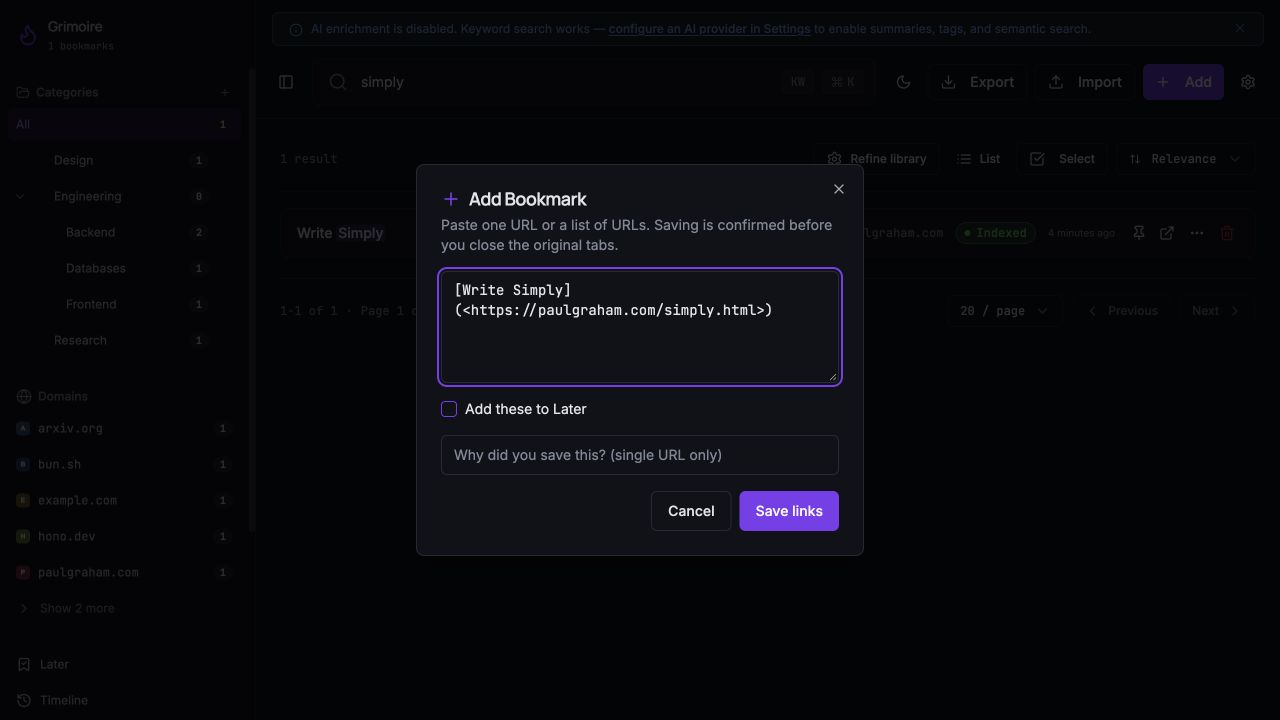
Let’s add Copy Markdown link beside Copy URL. The result should paste into a README or a Markdown note like this:
[Write Simply](<https://paulgraham.com/simply.html>)Ask for the plan first:
Plan a "Copy Markdown link" action in BookmarkCard's overflow
menu, beside the existing Copy URL action. Read the component,
its tests and src/lib/safe-url.ts first.
The copied link must survive square brackets/backslashes in its
title and parentheses in its URL. Blank title falls back to URL.
Reject unsafe URLs; report clipboard failure; announce success
only after the write succeeds. Work in list and grid views.
Copying must not open a bookmark or record an open.
Propose a small helper and focused tests. No edits or commands.
Read the plan. It should be a menu action, a small formatter and tests. If it proposes a new service or a database migration, narrow the task. Then switch to Build:
Implement the agreed Copy Markdown link plan.
Limit edits to src/components/BookmarkCard.tsx, its existing test
file, and new src/lib/bookmark-markdown.ts and .test.tsx files.
Reuse assertSafeExternalBookmarkUrl and existing menu/toast UI.
Test the rendered Markdown link, blank title, escaped characters,
unsafe destinations, both card layouts, clipboard rejection,
and no card-open callback or open-tracking request.
Preserve Copy URL for the next lab. No packages, schema or
lockfile changes. Ask before edits/commands; no commit or push.
Review each edit request. Run the focused tests yourself in Terminal 3:
npm test -- src/components/BookmarkCard.test.tsx src/lib/bookmark-markdown.test.tsx --maxWorkers=2The reference implementation has 35 passing tests at this stage. A different implementation may have a different count; check the cases, not just the number.
Use the tested reference solution
Use this on the expected previous stage. If your agent has already changed these files, compare its diff first. The helper refuses a conflicting patch; it does not reset your work. To follow the exact reference path, prepare another extracted kit in a different folder and apply the earlier stages in order: feature, regression, fix.
node workshop/apply.mjs feature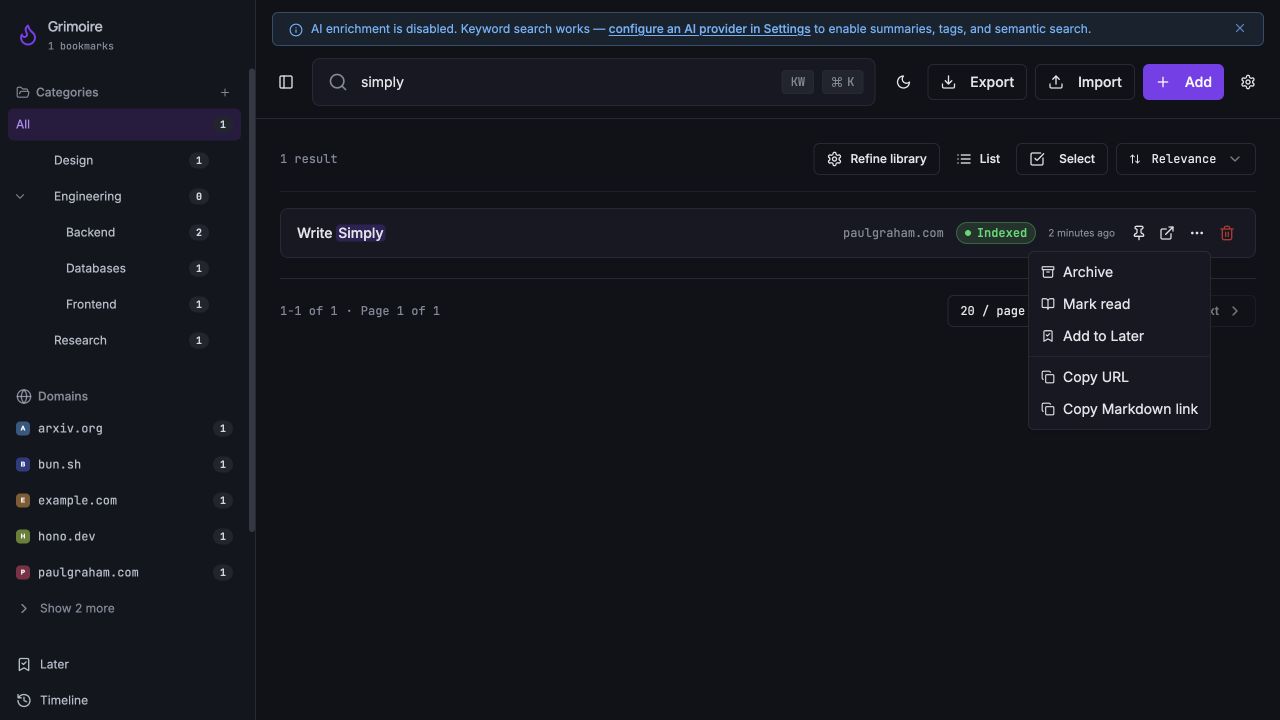
In the browser, open the article’s … menu and click Copy Markdown link. Paste into a temporary VS Code file without saving it. Check the title and destination. Switch between List and Grid and try again. The bookmark should stay closed and its open count should stay unchanged. Try Copy URL too.
Why test the rendered link?
A title can contain square brackets or a backslash. A URL can contain parentheses. A string can look plausible and still become a broken Markdown link. Our formatter uses the existing safe-URL check, escapes the title and encloses the destination in angle brackets:
import { assertSafeExternalBookmarkUrl } from "./safe-url";

export function bookmarkMarkdown(title: string, rawUrl: string): string {
  const url = assertSafeExternalBookmarkUrl(rawUrl);
  const label = (title.trim() || url)
    .replace(/\s+/g, " ")
    .replace(/[\\[\]]/g, "\\$&");
  const destination = url.replace(/</g, "%3C").replace(/>/g, "%3E");
  return `[${label}](<${destination}>)`;
}
The tests pass this output to the app’s Markdown renderer and check the resulting link’s name and destination. They also reject unsafe schemes and credential-bearing URLs.
Done when: the focused checks pass and the copied link works in both layouts.
3. Ask what happens when it fails
While preparing this tutorial, I found something small in the original Copy URL handler. It called clipboard.writeText, then immediately announced “URL copied.” The clipboard operation returns a promise. The message could appear before anything had been copied.
It’s an easy mistake to miss in a demo. Copying normally works on your laptop. A denied permission tells a different story.
Ask for tests before the fix:
Investigate the existing Copy URL action in BookmarkCard.
Its success toast appears before clipboard.writeText completes.
Add two regression tests to BookmarkCard.test.tsx, without fixing
application code: a pending write must not announce success;
a rejected write must show destructive feedback and no success.
Use the existing mocked toast and userEvent setup. Resolve the
pending promise after measuring the premature toast. Mock only
the clipboard boundary, not the handler being tested.
Ask before edits/commands. Expect the two new tests to fail.npm test -- src/components/BookmarkCard.test.tsx --maxWorkers=2Expect two new failures: premature success, and missing error feedback. The rejected clipboard promise can also appear as an unhandled rejection. We’re forcing that boundary in a test; the screenshots above show successful browser copying.
Use the tested reference solution
Use this on the expected previous stage. If your agent has already changed these files, compare its diff first. The helper refuses a conflicting patch; it does not reset your work. To follow the exact reference path, prepare another extracted kit in a different folder and apply the earlier stages in order: feature, regression, fix.
node workshop/apply.mjs regressionIf your new tests pass before a fix, inspect whether they actually wait for and measure the promise. Then ask for the small correction:
Fix the demonstrated Copy URL bug in BookmarkCard.tsx.
Await the clipboard write before the success toast and catch
failure with the existing destructive toast. Keep event
propagation stopped and preserve the copied URL text.
Do not change the regression tests, dependencies or other files.
Ask before edits/commands. Show the diff and actual test result.
Use the tested reference solution
Use this on the expected previous stage. If your agent has already changed these files, compare its diff first. The helper refuses a conflicting patch; it does not reset your work. To follow the exact reference path, prepare another extracted kit in a different folder and apply the earlier stages in order: feature, regression, fix.
node workshop/apply.mjs fixconst handleCopy = async (e: React.MouseEvent) => {
e.stopPropagation();
try {
await navigator.clipboard.writeText(bookmark.url);
toast({ title: "URL copied", description: bookmark.url });
} catch {
toast({ title: "Couldn't copy URL", description: "Check clipboard permission and try again.", variant: "destructive" });
}
};Run the same command again. The reference path now has 29 passing card tests. The two cases that failed must pass without weakening their assertions. Keep the surrounding app out of this fix.
4. Check what the agent can reach
Grimoire has an MCP endpoint for integrations. MCP gives a tool client a way to talk to the app. A bearer token lets that client authenticate. That makes it a useful place to practice checking access.
Keep the daemon running. In Terminal 3:
node workshop/check-token.mjs
node workshop/run.mjs security
The first command makes real HTTP requests to your local daemon. It creates a temporary integration token, tests it, then revokes it without printing its secret. Look for:
No token: 401
Valid token: 200 (MCP initialize accepted)
Revoked token: 401
Temporary token revoked; no secret printed.
The second command runs the repository’s integration-token and public-URL tests. Read them. This app is a single-user local service: the MCP token check does not turn its first-party REST API into a multi-user permission system. The token is not a read-only scope. Keep the daemon on loopback.
A page you save can contain instructions aimed at an agent. Treat that page as source material. It does not get to authorize shell commands, new tools or credential access. Don’t connect an agent to every integration just because it can discover one.
Return to Plan for a review:
Review my current diff against these cases: both copy actions
wait for clipboard success and handle rejection; Markdown titles
and URLs render safely; copying does not open or track a bookmark;
list and grid still work. Check for unrelated edits.
Also read the MCP integration-token tests and public-URL tests.
Explain what they prove, which permissions the token actually
grants, and what they do not prove about the REST API or deployment.
Read/search directly. Do not edit, run commands or use subagents.
Give file references for concrete issues and state unknowns.
Then run the final checks in Terminal 3:
git status --short
git diff --check
git diff --stat
npm test -- --maxWorkers=2
node workshop/run.mjs test-daemon
npm run type-check
npm run lint
npm run build
The reference changes finish at 363 frontend tests and 704 daemon tests passing, with type checking and production build passing. The eight lint warnings are unchanged. A green test run still needs the browser checks: search the article, copy each format, paste it, and try both layouts.
In VS Code’s Source Control sidebar, check the diff. Application changes should be limited to BookmarkCard.tsx, its tests, and the new Markdown helper and tests. The kit also adds workshop helpers, an OpenCode config and an instruction note. No lockfile, migration or provider settings should have changed.
Done when: the access checks behave as expected, the changed code is understood, and you can explain what remains untested. Don’t merge a change because an agent says it is secure.
Use this on Monday
Take a small annoyance from a codebase you already maintain. A confusing error. A missing filter. A repeated manual check. Make it small enough that you can read every changed line.
Help me scope one small change in this existing codebase.
Read the project instructions and relevant code first.
Explain the current behavior, acceptance cases, smallest files
to change, and tests/browser checks needed. Identify private
data, credentials, external services and permission boundaries.
Do not edit, install, migrate, commit or deploy yet.
Use the same sequence: understand the current path, agree on the behavior, change a small part, make failure reproducible, review the diff, then try it as a user. Save a local Git checkpoint once you understand a completed change; push and deployment are separate decisions.
What about open-weight models and several agents?
OpenCode can use different providers. An open-weight model can be hosted locally or by someone else; the name alone doesn’t tell you where your code goes. Local inference also needs suitable hardware. Keep the first lab provider-independent, then compare models on the same small change and the same acceptance cases.
For a team exercise, let one person implement while another reviews a clean diff in a separate session. If you later run agents in parallel, give them separate Git worktrees and non-overlapping tasks. Review the combined change and run its tests after merging. The core kit deliberately uses one writing agent at a time.
I like having an agent that can go and find things for me. In a repository, that gets more useful when I can follow it. By the end of this exercise, you should have a working change and a clear account of why it works. That’s something you can take back to your own code.
Checked 1 November 2026 on macOS Apple Silicon: fresh setup, reference feature → failing regressions → fix, source build, local HTTP token checks and browser save/search/copy. The copyable agent prompts guide the work; model outputs vary. Reference patches are included so you can reproduce the tested code. This walkthrough uses public and synthetic data.
Source: Grimoire by Robert Goniszewski, used under its MIT license. Tool references: OpenCode agents, permissions and VS Code terminals.